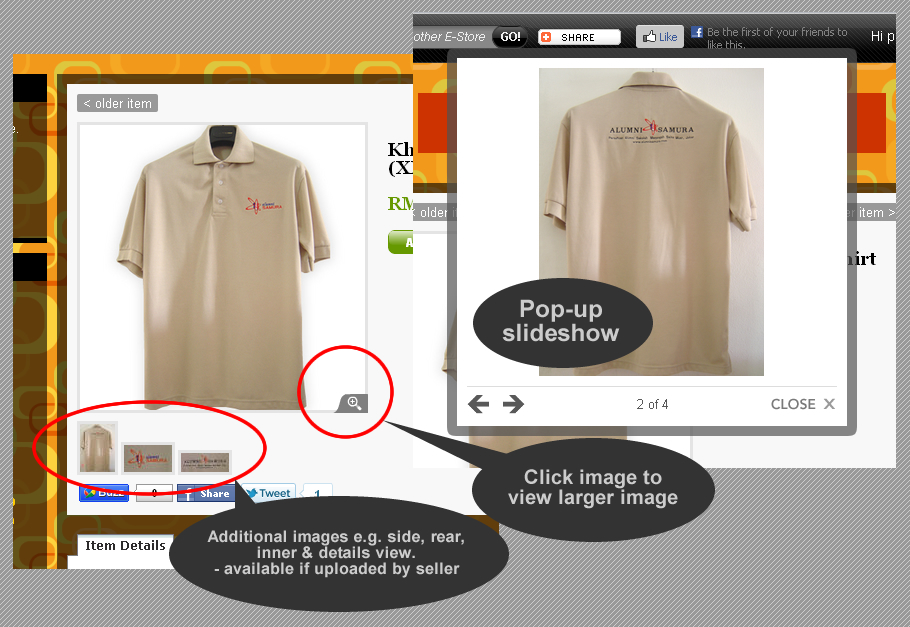
Now you can upload more item photos that will form a pop-up slideshow. Upload item's side view, rear view, zoom of details, inner view, etc. The pop-up slideshow will display a larger-sized photo and can be clicked to show next images. What better way to satisfy your customers than to aid them visually to better know about your products or services.
While you can upload up to 5 slideshow images on top of the item's main image, you can still upload & insert unlimited images in the item's description area. Sellers can always remove or change any of these slideshow images with their e-store admin access.
We hope for better online shopping experience for all our sellers' customers and better business for all our sellers.
Apa Itu SEO? Mengapa SEO penting untuk perniagaan online anda? Bagaimana My1Stop telah membantu SEO kedai-kedai online di My1Stop Virtual Shopping Mall dan bagaimana My1Stop boleh membantu SEO perniagaan anda sendiri? Jika anda berminat untuk pancing pengguna internet di luar lingkungan capaian anda yang sedia ada ... baca artikel ini sehingga selesai!
Secara ringkasnya, Search Engine Optimization (SEO) merujuk kepada teknik menjadikan sesuatu halaman web mudah dijumpai dan disenaraikan oleh enjin carian seperti Google dan Yahoo. Hakikatnya, jika anda sekadar mengharapkan promosi sendiri terhadap URL anda, anda hanya dapat capai pasaran di sekitar anda sahaja. Rugi! Apalah gunanya memiliki 'kewujudan di internet' jika anda masih memancing pelanggan sekeliling sahaja sebagaimana yang boleh dicapai menerusi perniagaan fizikal anda. Anda perlu memancing pelanggan yang mencari produk atau perkhidmatan anda tetapi di luar radius anda! Bagaimana? Antara kaedah yang terbukti mujarab, pastinya SEO!
Untuk SEO bagi blogshop, anda perlu pastikan anda semak settings blog - jika blogspot, di Settings > Basic > 'Let search engines find your blog?', pilih 'Yes'. Jika berniaga di Facebook, secara semulajadinya maklumat di Facebook mudah dijejak enjin carian. Namun begitu, baik berniaga di blog mahupun di Facebook tidak memberikan anda fasiliti perniagaan online yang ultimate - tiada shopping cart, sistem pembayaran online, sistem urus katalog dan tempahan/pelanggan yang dinamik. Adakah anda ingin menghadkan pasaran anda kepada dalam negara dan pelanggan yang selesa 'membeli-belah' di Facebook & blog sahaja? Adakah anda tidak berminat menguruskan perniagaan online secara dinamik? Jika ia tidak benar, maka anda memerlukan fasiliti e-dagang dan yang penting, ianya dilengkapi SEO!
Sudah mempunyai ruang niaga e-dagang sendiri tetapi kurang pasti samada ia dilengkapi SEO? Pastikan!
Teknik SEO ini sendiri berubah dengan masa. Google misalnya tidak lagi banyak bergantung kepada senarai keyword di dalam meta tag semata-mata tetapi kini mengambilkira faktor geo-lokasi, backlink (Google bijak mengesan antara backlink semulajadi & yang 'diada2kan' bertujuan meningkatkan SEO semata-mata), bounce-rate, speed laman anda, social media optimization, dan macam-macam lagi. SEO ini memerlukan aplikasi pelbagai teknik serentak yang perlu dikemaskini dari masa semasa. Jalan ringkas untuk memiliki fasiliti e-dagang yang turut dilengkapi dengan SEO, ialah dengan berniaga di online marketplace yang telah terbukti menyenaraikan kedai online peniaga di laman-laman pertama Google dan Yahoo Search.
My1Stop Virtual Shopping Mall, misalnya merupakan online marketplace yang turut melengkapkan setiap e-store peniaganya dengan SEO yang dikemaskini dari masa semasa. My1Stop turut melakukan SEO untuk mall itu sendiri bagi menambah potential customer kepada semua peniaga (cuba search “top online shopping mall” di Google Malaysia (google.com.my), anda akan lihat bagaimana My1Stop tersenarai di #2 di dalam senarai lebih 8,970,000 keputusan link).
Lihat pula kebarangkalian kedai peniaga di My1Stop muncul di laman pertama carian Google. Katalah anda mencari “top tudung labuh online shop” di Google.com.my, anda akan menemui Beautiful Tudung di #1 daripada lebih 65 ribu keputusan. Bagaimana pula dengan carian di Google.com sendiri? Cuba dan anda akan mendapati Beautiful Tudung masih muncul di laman pertama! Cuba search “trendy tudung labuh online” di Google.com ... anda akan masih lihat Beautiful Tudung muncul otai di dalam keputusan carian tersebut.
Bagaimana jika anda mencari sesuatu produk beserta lokasi, misalnya “vibram shoes sungai petani”, lihat bagaimana kedai pakej PERCUMA My1Stop juga boleh dijumpai di #1 Google.com.my. Terlalu terperinci? Cuba “vibram shoes malaysia” ... e-store Vibramshoes masih mampu bersaing dengan muncul di laman kedua Google.com.my.
Bagaimana dengan carian untuk keyword Bahasa Malaysia & Bahasa Inggeris? Cuba “nicogel – farmasi online” di Google.com.my dan cuba pula “nicogel – pharmacy online” di Google.com ... kedua-duanya menyenaraikan e-Farmasi di laman pertama dengan #1 drp 2 lebih ribu keputusan di Google.com.my dan #1 drp lebih 25 ribu keputusan di Google.com!
Lihat lagi snapshot carian yang membawa kepada penyenaraian kedai2 online di My1Stop:
Smartneasy Biz di #1 drp 35,400 keputusan utk "teh tarik susu kambing"
Chaoz Craze di #1 drp 12,600 keputusan utk "koleksi sedondon t-shirt muslimah online"
FizBiz E-Shop di #1 drp 11,600 keputusan utk "latest tudung maira online"
Anda telahpun lihat bagaimana SEO My1Stop telah membantu meningkatkan kebarangkalian perniagaan online peniaga muncul awal di Google. Namun begitu, jika anda mempunyai kedai online di My1Stop tetapi gagal menjumpai kedai anda di dalam carian, jangan gusar ... masih ada yang anda boleh lakukan untuk perbaiki kedudukan anda di Google Search tanpa perlu melakukan sebarang kerja2 pengaturcaraan/ (programming). Anda hanya perlu tahu beberapa tips untuk melonjakkan SEO kedai anda sendiri, agar mampu mengatasi saingan lain termasuk saingan sesama kedai di My1Stop sendiri!
If you are a seller with a Facebook account, or a website/blog of your own to start with ... then you should read on ...
Frankly I have not seen much of RSS Feed flying around in sellers’ Facebook walls, e-commerce websites nor blogshops, possibly due to the failure of realizing the potential of RSS in boosting businesses, hence the reason why I choose to highlight this valuable viral marketing tool. Don’t worry, I will not go into the technical aspects of RSS as this article is intended for sellers, not developers.
Understanding the RSS Feed
RSS is a simple & efficient way for any web user to subscribe to any latest content of any website e.g. news articles, blog posts, photos or videos, without having to visit the website itself. This has become especially useful now that the internet is flooded with loads of content-driven websites and visiting each website to find out the latest updates can be wearying. Subscribing to e-mails may not be the best answer either as too many e-mail notifications spells 'messy inbox' and such e-mails can often be mistaken as spam/unwanted e-mails.
Here's where RSS Feed solves the problem …
With RSS Feed, web users can subscribe content from multiple websites and display them in their own ‘space’ such as their Facebook walls, their blogs, feed reader sites e.g. Bloglines, My Yahoo! or Google Reader or even their browser e.g. Mozilla Firefox and the Internet Explorer 7. So all your favorite goodies can now be fed to you in one place instead of you going around the cyber space, wasting time looking for what may and may not be important to you!
Depending on the limitations set by the feed reader applications, subscribers normally can choose the number of items to be displayed, full description or excerpt, with optional publishing date, author, image, etc. Each feed item carries a link to the source website so one can go straight to the topic/item of interest.
The magic works like this – A website hosting the content should first have a system that converts its content e.g. news articles, into a standard format for the RSS reader. This content is supplied to a subscriber in a form of a URL (commonly identified by the label "RSS Feed" and the RSS icon . By simply inputting this URL into an RSS Feed reader, the website content can now be 'magically' displayed & best of all, constantly updated for the subscriber.
For New Media platforms such as Facebook, Twitter, YouTube, blogs & even My1Stop Virtual Shopping Mall e-stores, the ‘recent content’ conversion to RSS Feed format has already been provided to its users for free. If you have your own website developed by a web design company or a freelancer, and your site does not have its own RSS Feed, you can either set up your own account in any of the above New Media sites for free and later have your web developer include your Feed and its URL in your website for others to subscribe, or get them to create your site’s own RSS system & URL, which may cost you some money but give you greater flexibility as to what exactly to convert to Feed.
How is RSS Feed Useful to a Seller
In a retailing environment, RSS feed serves as a viral marketing tool in that it delivers your content to a naturally growing network, like a spreading virus. For instance, a company/seller with a store at My1Stop Virtual Shopping Mall only has to maintain his/her catalog by uploading new products/services & edit or remove the items when necessary. Customers can view a realtime updated catalog of the store straight from their ‘space’ by using the store’s RSS Feed URL with any web RSS Feed reader application as mentioned previously, without having the seller to send repetitive notifications of new items added. Whenever a customer clicks on any link in the feed, he/she will be taken straight to the item in the e-store for more information about the item, to place an order or purchase it online. This, is making RSS Feed work for you!
And you haven’t even got to the best part yet …
The best part of it is when not just one, two, but unlimited other web users, beyond your own network who may find your content worth following, subscribe to your Feed. These other subscribers, whether you know them personally or not, voluntarily display your dynamically updated content viewable by their own network, generating more potential customers for you. This is viral marketing potential normally provided free for you, yet often ignored.
How to Start Using RSS Feed for Viral Marketing
To display a website’s feed on the Facebook Wall/Profile, all one has to do is add an RSS application as a new Facebook application e.g. Social RSS or RSS Graffiti, key in the RSS Feed URL and select preferred publish settings. You can have multiple Feeds displayed as one feed collection by entering several RSS Feed URLs into the RSS application.
With Social RSS, the content from the feed appears as a tab on the Facebook Wall and can be set to be displayed in the News Feed everytime a new content is added. For those familiar with Facebook, you know well that this means that your hundreds to thousands of Facebook friends and even their friends (subject to privacy settings), can view this content too, not just by visiting your Profile, but simply by clicking ‘Home’. The trick is to get many LIKEs or comments for a post and it gets ‘sticky’ and stay on the Home page longer in the ‘Top News’ section.
If you have a blog, you can easily display any website’s feed by adding an RSS gadget/widget to your blog and similarly enter the RSS Feed URL – add multiple widgets to display multiple feeds. Sorry, Blogger does not support images in the feed items. Since blogs are networked to one another in many ways, using RSS Feed in a blog still gives you viral marketing. In fact, it is advantageous to both the blogger and the Feed author as the Feed content can also be crawled by search engines and has been shown to have contributed to the blogs keywords, which in turn gives the blog higher chances at being listed in search results.
To display RSS Feed in your browser, you just have to click any RSS Feed URL and follow the steps shown by your browser. With Mozilla Firefox, you can display any feed on your bookmark tab using Live Bookmarks application.
In a nutshell …
RSS Feed is a way for web users to have their own ‘personalized daily digest’ – updated news column, business tips, catalog, gossip segment … you name it. It is a great way to aggregate & organize the massive amount of content from the web, tailored to one’s interest.
To a seller, RSS can be an effective & efficient tool for expanding business to a wider market at least cost & effort. It is a (normally) free method to encourage others to subscribe to your latest content e.g. catalog, promotions, etc. and to enable sharing of your updated content from one network to another beyond your normal reach. It is about using the New Media to its full potential & doing business online wisely. This in no way suggests that you ignore other marketing strategies, but merely as an addition to your multitude of efforts in boosting your business – an addition, that if disregarded shall leave you in a loss ;)
PULAU PINANG: Dalam tempoh dua tahun lalu kerajaan sudah mengambil tindakan terhadap 400 individu yang menjalankan perniagaan menerusi Internet kerana tidak berdaftar dengan Suruhanjaya Syarikat Malaysia.Timbalan Menteri Perdagangan Dalam Negeri, Koperasi dan Kepenggunaan, Datuk Rohani Abdul Karim berkata, kesemua mereka dihadapkan ke mahkamah mengikut Seksyen 12 (1)(a) Akta Pendaftaran Perniagaan 1956 (Pindaan 2001) yang membawa hukuman denda tidak lebih RM50,000 atau penjara tidak lebih dua tahun.
"Individu atau syarikat yang menjalankan perniagaan menggunakan laman web atau Internet sebenarnya tidak terkecuali dan mesti mendaftarkan perniagaan mereka," katanya kepada pemberita selepas merasmikan Majlis Dialog Amalan Perniagaan Beretika Zon Utara, di sini hari ini.
Katanya, langkah itu bertujuan melindungi pengguna daripada unsur penipuan selain memastikan peniaga mematuhi etika perniagaan.
Beliau berkata, kerajaan juga menerusi Suruhanjaya Komunikasi dan Multimedia sentiasa memantau laman web yang menjalankan perniagaan bagi mengesan pihak yang gagal mendaftarkan perniagaan mereka.
"Kita mahu golongan ahli perniagaan mempunyai kesedaran bahawa mereka mempunyai tanggungjawab dan kod etika yang harus dipatuhi supaya pengguna tidak menjadi mangsa penipuan," katanya.-Bernama